- Shehr Yar
- 3 April, 2026
Few development problems are more frustrating than CSS not working.
You write the style, check the syntax, and refresh the page. However, nothing changes. No color update, no spacing shift, and no layout difference.
This situation is common for both beginners and experienced developers. At Shehryar Dev, these issues are handled daily, and in most cases, the fix is simpler than it appears.
A CSS not working fix is usually simple. However, the challenge is identifying the real cause. Several issues can create the same result.
Therefore, understanding the root problem is the first step.
The Most Common Reason: Specificity
CSS follows a priority system. This system decides which rule is applied.
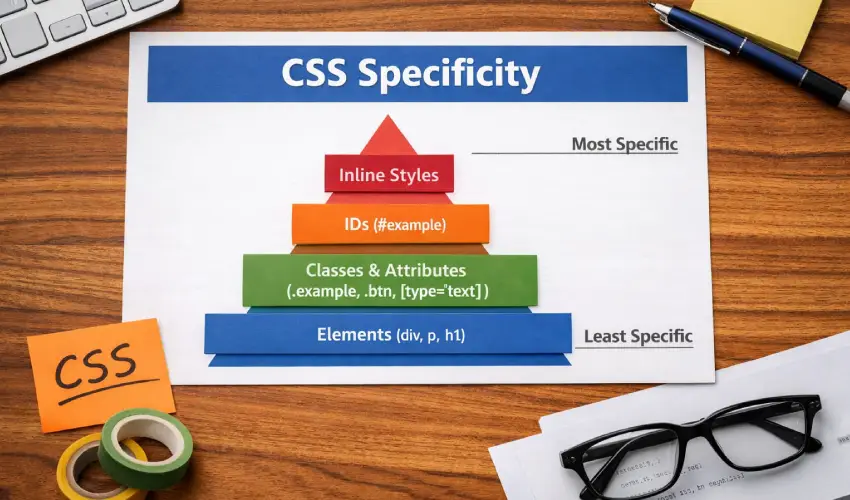
This concept is called specificity.
In many cases, your CSS is not working because another rule is stronger.
For example, a class-based style can be overridden by a more specific selector. As a result, your rule exists but does not apply.
Consider this situation. A paragraph is set to grey. However, another rule targets the same paragraph using a class and sets it to black. The paragraph will remain black.
Therefore, the grey rule appears to do nothing.
In general:
- IDs have the highest priority
- Classes come next
- Element selectors have the lowest priority
The Override Problem: !important
The !important rule forces a style to take priority.
It can solve issues quickly. However, overusing it creates bigger problems.
When multiple rules use !important, conflicts increase. As a result, CSS becomes difficult to manage.
If your styles are not applying, check for excessive use of !important.
In most cases, this is the root cause.
Caching: When the Browser Shows an Old Version
Browsers store CSS files to improve performance.
This process is called caching.
However, it can cause confusion. You update your CSS, refresh the page, and see no changes.
In this case, the browser is showing an old version.
To fix this, perform a hard refresh.
For example, in Chrome or Firefox, press Shift + Refresh. This forces the browser to load the latest files.
If the style appears after this step, caching was the issue.
File Loading Order and Conflicts
CSS is applied in the order it loads.
If a later file contains a conflicting rule, it will override earlier styles.
This issue is common in platforms like WordPress.
Themes, plugins, and custom stylesheets all load in sequence. As a result, one file can override another.
To check this, use browser developer tools.
The styles panel shows which rule is applied and which ones are overridden.
Selector Errors and Typos
Sometimes, the issue is simple.
If a selector does not match any element, the style will not apply.
There is no error message. The rule is silently ignored.
Common mistakes include:
- Incorrect class names
- Missing dot or hash in selectors
- Targeting elements that no longer exist
- Changes in HTML structure
Developer tools make these issues easy to identify.
How Developer Tools Simplify Debugging
Most CSS problems become clear with developer tools.
The Elements panel allows you to inspect any element.
The Styles panel shows all applied rules. It also highlights overridden styles.
In addition, the Computed panel shows the final values.
These tools explain not just what is happening, but why.
At Shehryar Dev, debugging always starts here. This approach removes guesswork and speeds up the process.
Best Practices to Prevent CSS Issues
Many CSS problems can be avoided with a structured approach.
- Use clear naming conventions like BEM
- Avoid inline styles when possible
- Maintain proper stylesheet order
- Limit the use of !important
- Always check developer tools before making changes
Following these steps reduces future issues.
Conclusion
When CSS is not working, the cause is usually simple.
Common issues include specificity conflicts, caching, load order, and selector errors.
Once identified, these problems are easy to fix.
The key is knowing where to look.
Developer tools provide clear answers. They turn a confusing issue into a structured process.
At Shehryar Dev, the focus is on solving these problems efficiently by identifying the exact cause instead of guessing. This approach saves time and keeps code clean.
A CSS not working fix does not require rewriting everything. Instead, it requires understanding which rule is applied and why.

Related Post